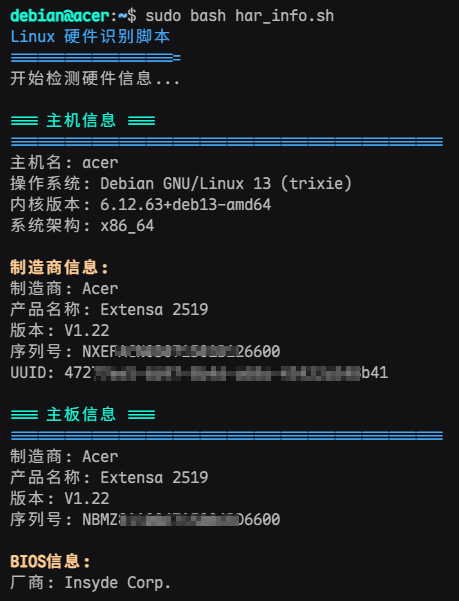

一行命令获取 windows linux 电脑服务器硬件信息
目录
查看电脑详细的硬件配置和参数,一般都需要安装专门的硬件检测软件,总感觉不太方便,笔者就 Vibe Coding 了两份可以分别查看 Windows 和 Linux 电脑硬件信息的脚本,并且把脚本部署到云上VPS,现在可以不需要安装专门的检测软件了,直接在命令行窗口运行一条简单的命令,就可以查看到自己电脑的硬件信息了,包括主板、CPU、内存、硬盘、显卡等等硬件的型号、基本参数,序列号等多项信息,非常直观方便。
这个获取硬件信息的脚本运行起来也非常简单,前提是你的电脑能上网,下面说说它的使用方法:
一行命令获取Windows系统电脑的硬件配置
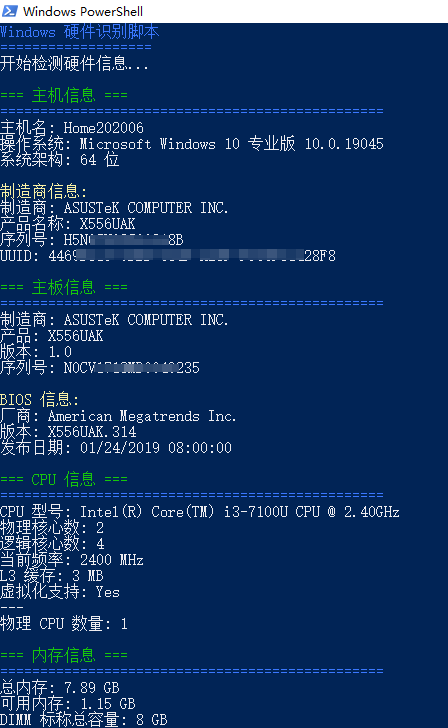
Windows系统的电脑,支持 Windows 10/11/Server 等版本,这里以Windows 10 来演示:
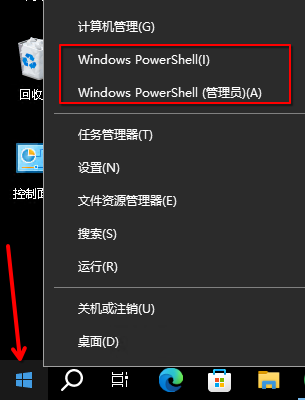
- 右键点击“开始”菜单,点击 “Powershell” 选项,打开Powershell 命令行窗口
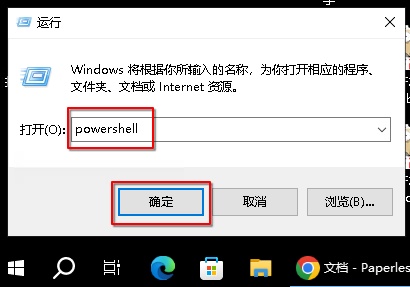
- 或者按下 Win+R 快捷键打开“运行”窗口,输入"powershell" 再点击“确定”,也可以打开powershell 命令行窗口
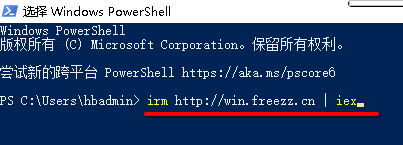
- 在 Powershell 窗口中输入如下这条命令并按回车键执行它:
irm http://win.freezz.cn | iex
- 执行命令后,稍等几秒钟,就可以看到电脑所有的硬件配置信息了
一行命令获取Linux系统电脑的硬件配置
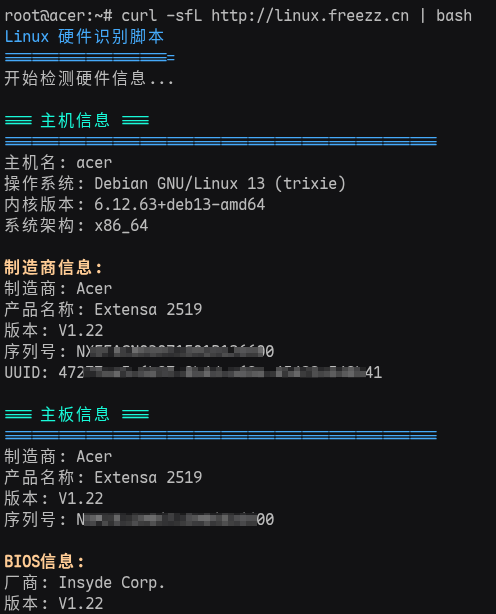
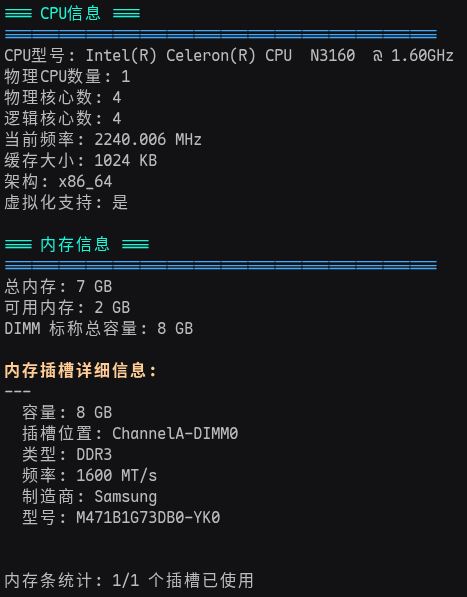
如果是Linux系统的电脑,比如 Red Hat / Centos / Debian / Ubuntu / 银河麒麟Kylin / 欧拉openEuler 等,
打开命令行终端Shell,执行这行命令:
curl -sfL http://linux.freezz.cn | bash
下面是脚本的源码
获取windows电脑硬件配置信息的脚本源码
# Windows Hardware Information Script
# Converted from Linux har_info4.sh
# Requires PowerShell 5.1 or later (Administrator privileges recommended)

$ErrorActionPreference = "SilentlyContinue"

# Colors (Simulated with Write-Host)
function Print-Section {
    param([string]$Title)
    Write-Host "=== $Title ===" -ForegroundColor Green
    Write-Host "================================================" -ForegroundColor Blue
}

function Print-SubSection {
    param([string]$Title)
    Write-Host "`n$Title" -ForegroundColor Yellow
}

function Check-Command {
    param([string]$Command)
    if (Get-Command $Command -ErrorAction SilentlyContinue) {
        return $true
    }
    return $false
}

# --- System Info ---
function Get-SystemInfo {
    Print-Section "主机信息"

    $os = Get-CimInstance Win32_OperatingSystem
    $cs = Get-CimInstance Win32_ComputerSystem
    $csp = Get-CimInstance Win32_ComputerSystemProduct

    Write-Host "主机名: $($cs.DNSHostName)"
    Write-Host "操作系统: $($os.Caption) $($os.Version)"
    Write-Host "系统架构: $($os.OSArchitecture)"

    Print-SubSection "制造商信息:"
    Write-Host "制造商: $($cs.Manufacturer)"
    Write-Host "产品名称: $($cs.Model)"
    Write-Host "序列号: $($csp.IdentifyingNumber)"
    Write-Host "UUID: $($csp.UUID)"
    Write-Host ""
}

# --- Motherboard Info ---
function Get-MotherboardInfo {
    Print-Section "主板信息"

    $bb = Get-CimInstance Win32_BaseBoard
    $bios = Get-CimInstance Win32_BIOS

    Write-Host "制造商: $($bb.Manufacturer)"
    Write-Host "产品: $($bb.Product)"
    Write-Host "版本: $($bb.Version)"
    Write-Host "序列号: $($bb.SerialNumber)"

    Print-SubSection "BIOS 信息:"
    Write-Host "厂商: $($bios.Manufacturer)"
    Write-Host "版本: $($bios.SMBIOSBIOSVersion)"
    Write-Host "发布日期: $($bios.ReleaseDate)"
    Write-Host ""
}

# --- CPU Info ---
function Get-CpuInfo {
    Print-Section "CPU 信息"

    $cpus = @(Get-CimInstance Win32_Processor)
    foreach ($cpu in $cpus) {
        Write-Host "CPU 型号: $($cpu.Name)"
        Write-Host "物理核心数: $($cpu.NumberOfCores)"
        Write-Host "逻辑核心数: $($cpu.NumberOfLogicalProcessors)"
        Write-Host "当前频率: $($cpu.MaxClockSpeed) MHz"
        Write-Host "L3 缓存: $([math]::Round($cpu.L3CacheSize / 1KB, 2)) MB"

        $virt = "Unknown"
        if ($cpu.VirtualizationFirmwareEnabled) { $virt = "Yes" } else { $virt = "No" }
        Write-Host "虚拟化支持: $virt"
        Write-Host "---"
    }
    Write-Host "物理 CPU 数量: $($cpus.Count)"
    Write-Host ""
}

# --- Memory Info ---
function Get-MemoryInfo {
    Print-Section "内存信息"

    $cs = Get-CimInstance Win32_ComputerSystem
    $os = Get-CimInstance Win32_OperatingSystem

    $totalMemGB = [math]::Round($cs.TotalPhysicalMemory / 1GB, 2)
    $freeMemGB = [math]::Round($os.FreePhysicalMemory / 1MB, 2) # FreePhysicalMemory is in KB

    Write-Host "总内存: $totalMemGB GB"
    Write-Host "可用内存: $freeMemGB GB"

    $dimms = Get-CimInstance Win32_PhysicalMemory
    $dimmTotal = 0
    foreach ($d in $dimms) {
        $dimmTotal += $d.Capacity
    }
    $dimmTotalGB = [math]::Round($dimmTotal / 1GB, 2)
    Write-Host "DIMM 标称总容量: $dimmTotalGB GB"

    Print-SubSection "内存插槽详细信息:"
    $installedSlots = 0
    foreach ($d in $dimms) {
        $sizeGB = [math]::Round($d.Capacity / 1GB, 2)
        Write-Host "---"
        Write-Host "  容量: $sizeGB GB"
        Write-Host "  插槽位置: $($d.DeviceLocator) / $($d.BankLabel)"
        Write-Host "  类型: Unknown (Type $($d.MemoryType))"
        Write-Host "  频率: $($d.Speed) MHz"
        Write-Host "  制造商: $($d.Manufacturer)"
        Write-Host "  型号: $($d.PartNumber)"
        $installedSlots++
    }

    # Try to guess total slots (Win32_PhysicalMemoryArray)
    $memArray = Get-CimInstance Win32_PhysicalMemoryArray
    if ($memArray) {
        Write-Host ""
        Write-Host "内存条统计: $installedSlots/$($memArray.MemoryDevices) 个插槽已使用"
    }
    Write-Host ""
}

# --- Disk Info ---
function Get-DiskInfo {
    Print-Section "硬盘信息"

    if (Get-Command Get-PhysicalDisk -ErrorAction SilentlyContinue) {
        Print-SubSection "磁盘列表 (Get-PhysicalDisk):"
        $disks = Get-PhysicalDisk | Sort-Object DeviceId
        foreach ($d in $disks) {
            $size = [math]::Round($d.Size / 1GB, 2)
            $type = $d.MediaType
            if ($type -eq "Unspecified") { $type = "Unknown (RAID Virtual Disk?) " }

            Write-Host "--- Disk $($d.DeviceId) ---"
            Write-Host "  型号: $($d.Model)"
            Write-Host "  容量: $size GB"
            Write-Host "  类型: $type"
            Write-Host "  序列号: $($d.SerialNumber)"
            Write-Host "  总线类型: $($d.BusType)"
        }
    } else {
        Print-SubSection "磁盘列表 (Win32_DiskDrive):"
        $disks = Get-CimInstance Win32_DiskDrive
        foreach ($d in $disks) {
            $size = [math]::Round($d.Size / 1GB, 2)
            Write-Host "--- $($d.DeviceID) ---"
            Write-Host "  型号: $($d.Model)"
            Write-Host "  容量: $size GB"
            Write-Host "  序列号: $($d.SerialNumber)"
        }
    }
    Write-Host ""
}

# --- Storage & RAID Info ---
function Get-StorageInfo {
    Print-Section "存储控制器与 RAID 信息"

    Print-SubSection "存储控制器 (SCSIAdapter):"
    $controllers = Get-CimInstance Win32_SCSIController
    foreach ($c in $controllers) {
        Write-Host "    名称: $($c.Name)"
        Write-Host "    制造商: $($c.Manufacturer)"
        Write-Host "    驱动版本: $($c.DriverVersion)"
        Write-Host ""
    }

    # Check for external tools
    # Broadcom/LSI MegaRAID/StorCLI
    # Search common paths
    $tools = @("storcli64.exe", "storcli.exe", "MegaCli64.exe", "MegaCli.exe", "perccli64.exe", "arcconf.exe")
    $foundTool = $false

    # Add current dir to path for this session
    $env:Path += ";$PWD"

    foreach ($tool in $tools) {
        if (Check-Command $tool) {
            $foundTool = $true
            Print-SubSection "检测到 RAID 工具: $tool"

            if ($tool -match "storcli|perccli") {
                Write-Host "控制器信息:"
                & $tool /cALL show | Select-String "Controller|Model|Serial|Status|FW|Package"
                Print-SubSection "虚拟磁盘:"
                & $tool /cALL/vALL show | Select-String "DG|VD|TYPE|State|Size|Sectors|Stripe|RAID"
                Print-SubSection "物理磁盘:"
                # StorCLI output is usually already a table (single line per disk), so we can just show relevant lines
                # or the whole table header + rows
                $pdOut = & $tool /cALL/eALL/sALL show all
                $pdOut | Select-String "EID|Slot|DID|State|Size|Intf|Med|Model|SN|FW|PN"
            }
            elseif ($tool -match "MegaCli") {
                Write-Host "控制器信息:"
                & $tool -AdpAllInfo -aALL | Select-String "Product Name|Serial No|FW Package Build"
                Print-SubSection "虚拟磁盘:"
                & $tool -LdInfo -aALL | Select-String "Virtual Drive|RAID Level|State|Size"
                Print-SubSection "物理磁盘:"
                # Parse MegaCli output for single line summary
                $pdList = & $tool -PdList -aALL
                $currentDisk = @{}
                foreach ($line in $pdList) {
                    if ($line -match "^Slot Number\s*:\s*(\d+)") {
                        if ($currentDisk.Keys.Count -gt 0) {
                            Write-Host "    槽位: $($currentDisk.Slot) 型号: $($currentDisk.Model) 容量: $($currentDisk.Size) SN: $($currentDisk.SN) FW: $($currentDisk.FW)"
                            $currentDisk = @{}
                        }
                        $currentDisk.Slot = $matches[1]
                    }
                    elseif ($line -match "^Raw Size\s*:\s*(.+)") { $currentDisk.Size = $matches[1].Trim() }
                    elseif ($line -match "^Inquiry Data\s*:\s*(.+)") { $currentDisk.Model = $matches[1].Trim() }
                    elseif ($line -match "^Serial Number\s*:\s*(.+)") { $currentDisk.SN = $matches[1].Trim() }
                    elseif ($line -match "^Device Firmware Level\s*:\s*(.+)") { $currentDisk.FW = $matches[1].Trim() }
                }
                # Print last disk
                if ($currentDisk.Keys.Count -gt 0) {
                     Write-Host "    槽位: $($currentDisk.Slot) 型号: $($currentDisk.Model) 容量: $($currentDisk.Size) SN: $($currentDisk.SN) FW: $($currentDisk.FW)"
                }
            }
            elseif ($tool -match "arcconf") {
                 Write-Host "Adaptec RAID Info:"
                 & $tool getconfig 1
            }

            Write-Host ""
        }
    }

    if (-not $foundTool) {
        Write-Host "未在 PATH 中检测到常用 RAID 管理工具 (storcli, megacli, arcconf 等)"
        Write-Host "如需详细 RAID 信息,请安装相应工具并将路径添加到环境变量。"
    }
    Write-Host ""
}

# --- GPU Info ---
function Get-GpuInfo {
    Print-Section "显卡/GPU 信息"

    $gpus = Get-CimInstance Win32_VideoController
    foreach ($gpu in $gpus) {
        $mem = "N/A"
        if ($gpu.AdapterRAM) { $mem = "$([math]::Round($gpu.AdapterRAM / 1MB, 0)) MB" }

        Write-Host "名称: $($gpu.Name)"
        Write-Host "显存: $mem"
        Write-Host "驱动版本: $($gpu.DriverVersion)"
        Write-Host "---"
    }

    if (Check-Command "nvidia-smi") {
        Print-SubSection "NVIDIA GPU 详细信息:"
        nvidia-smi --query-gpu=name,memory.total,driver_version --format=csv,noheader
        Write-Host ""
        nvidia-smi
    }
    Write-Host ""
}

# --- Network Info ---
function Get-NetworkInfo {
    Print-Section "网卡信息"

    $nics = Get-NetAdapter | Where-Object { $_.PhysicalMediaType -ne "Unspecified" }
    foreach ($nic in $nics) {
        Write-Host "--- $($nic.Name) ---"
        Write-Host "  描述: $($nic.InterfaceDescription)"
        Write-Host "  MAC 地址: $($nic.MacAddress)"
        Write-Host "  链接速度: $($nic.LinkSpeed)"
        Write-Host "  状态: $($nic.Status)"

        $ip = Get-NetIPAddress -InterfaceIndex $nic.InterfaceIndex -AddressFamily IPv4 -ErrorAction SilentlyContinue
        if ($ip) {
            Write-Host "  IPv4 地址: $($ip.IPAddress)"
        }

        Write-Host "  驱动名称: $($nic.DriverName)"
        Write-Host "  驱动版本: $($nic.DriverVersion)"
        Write-Host ""
    }
}

# --- Main ---
Clear-Host
Write-Host "Windows 硬件识别脚本" -ForegroundColor Blue
Write-Host "===================" -ForegroundColor Blue
Write-Host "开始检测硬件信息...`n"

Get-SystemInfo
Get-MotherboardInfo
Get-CpuInfo
Get-MemoryInfo
Get-DiskInfo
Get-StorageInfo
Get-GpuInfo
Get-NetworkInfo

Write-Host "硬件信息检测完成! " -ForegroundColor Green
Write-Host "`n按回车键退出... "
# Read-Host
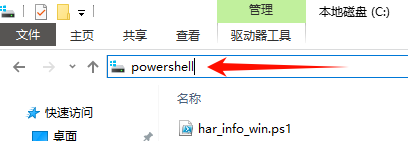
使用方法:把上面的脚本内容保存为 har_info_win.ps1文件,存放到任何目录,比如C盘根目录下
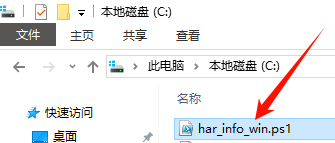 在当前的资源管理器窗口的地址框中输入
 powershell,然后回车,会弹出powershell命令窗口并自动定位到C盘根目录下
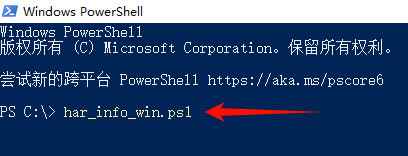
 在powershell命令窗口输入
 ./har_info_win.ps1并回车执行这一条命令,就可以执行脚本并显示出结果了
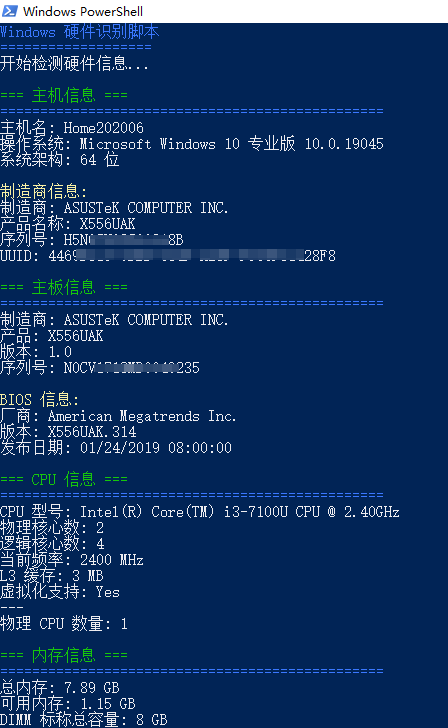
获取Linux电脑硬件配置信息的脚本源码
#!/bin/bash
# Linux硬件识别脚本
# 支持识别主机、主板、CPU、内存、硬盘、阵列卡、显卡、网卡等硬件信息
# 颜色定义
RED='\033[0;31m'
GREEN='\033[0;32m'
YELLOW='\033[1;33m'
BLUE='\033[0;34m'
NC='\033[0m' # No Color
# 检查是否为root用户
check_root() {
if [[ $EUID -ne 0 ]]; then
echo -e "${YELLOW}警告: 建议以root权限运行以获取完整信息${NC}"
echo "当前以普通用户权限运行,某些信息可能无法获取"
echo
fi
}
# 打印分隔线
print_separator() {
echo -e "${BLUE}================================================${NC}"
}
# 检查命令是否存在
check_command() {
if ! command -v $1 &> /dev/null; then
return 1
fi
return 0
}
# 获取主机信息
get_system_info() {
echo -e "${GREEN}=== 主机信息 ===${NC}"
print_separator
# 主机名
echo "主机名: $(hostname)"
# 操作系统信息
if [ -f /etc/os-release ]; then
. /etc/os-release
echo "操作系统: $NAME $VERSION"
fi
# 内核版本
echo "内核版本: $(uname -r)"
# 架构
echo "系统架构: $(uname -m)"
# 系统制造商信息
if check_command dmidecode; then
echo
echo -e "${YELLOW}制造商信息:${NC}"
echo "制造商: $(sudo dmidecode -s system-manufacturer 2>/dev/null || echo '未知')"
echo "产品名称: $(sudo dmidecode -s system-product-name 2>/dev/null || echo '未知')"
echo "版本: $(sudo dmidecode -s system-version 2>/dev/null || echo '未知')"
echo "序列号: $(sudo dmidecode -s system-serial-number 2>/dev/null || echo '未知')"
echo "UUID: $(sudo dmidecode -s system-uuid 2>/dev/null || echo '未知')"
fi
echo
}
# 获取主板信息
get_motherboard_info() {
echo -e "${GREEN}=== 主板信息 ===${NC}"
print_separator
if check_command dmidecode; then
echo "制造商: $(sudo dmidecode -s baseboard-manufacturer 2>/dev/null || echo '未知')"
echo "产品名称: $(sudo dmidecode -s baseboard-product-name 2>/dev/null || echo '未知')"
echo "版本: $(sudo dmidecode -s baseboard-version 2>/dev/null || echo '未知')"
echo "序列号: $(sudo dmidecode -s baseboard-serial-number 2>/dev/null || echo '未知')"
# BIOS信息
echo
echo -e "${YELLOW}BIOS信息:${NC}"
echo "厂商: $(sudo dmidecode -s bios-vendor 2>/dev/null || echo '未知')"
echo "版本: $(sudo dmidecode -s bios-version 2>/dev/null || echo '未知')"
echo "发布日期: $(sudo dmidecode -s bios-release-date 2>/dev/null || echo '未知')"
else
echo "需要dmidecode工具获取主板信息"
fi
echo
}
# 获取CPU信息(支持x86、ARM64、LoongArch等国产架构)
get_cpu_info() {
echo -e "${GREEN}=== CPU信息 ===${NC}"
print_separator
ARCH=$(uname -m)
if [ "$ARCH" = "x86_64" ] || [ "$ARCH" = "i386" ] || [ "$ARCH" = "i686" ]; then
# ========== x86/x64 架构 ==========
if [ -f /proc/cpuinfo ]; then
cpu_model=$(grep "model name" /proc/cpuinfo | head -1 | cut -d: -f2 | sed 's/^ *//')
echo "CPU型号: ${cpu_model:-未知}"
physical_cpus=$(grep "physical id" /proc/cpuinfo | sort -u | wc -l)
physical_cores_per_cpu=$(grep "cpu cores" /proc/cpuinfo | head -1 | awk '{print $4}')
physical_cores=$((physical_cpus * (physical_cores_per_cpu + 0)))
logical_cores=$(grep "processor" /proc/cpuinfo | wc -l)
echo "物理CPU数量: $physical_cpus"
echo "物理核心数: $physical_cores"
echo "逻辑核心数: $logical_cores"
cpu_mhz=$(grep "cpu MHz" /proc/cpuinfo | head -1 | cut -d: -f2 | sed 's/^ *//')
echo "当前频率: ${cpu_mhz:-N/A} MHz"
cache_size=$(grep "cache size" /proc/cpuinfo | head -1 | cut -d: -f2 | sed 's/^ *//')
echo "缓存大小: ${cache_size:-N/A}"
echo "架构: $ARCH"
if grep -q "vmx\|svm" /proc/cpuinfo; then
echo "虚拟化支持: 是"
else
echo "虚拟化支持: 否"
fi
fi
elif [ "$ARCH" = "aarch64" ]; then
# ========== ARM64 架构(鲲鹏、飞腾等)==========
if [ -f /proc/cpuinfo ]; then
# 识别 CPU 型号(基于 implementer + part)
CPU_IMPL=$(grep "CPU implementer" /proc/cpuinfo | head -1 | awk '{print $4}')
CPU_PART=$(grep "CPU part" /proc/cpuinfo | head -1 | awk '{print $4}')
case "$CPU_IMPL" in
"0x48")
# Huawei Kunpeng
if [ "$CPU_PART" = "0xd01" ]; then
CPU_MODEL="HUAWEI,Kunpeng 920"
elif [ "$CPU_PART" = "0xd02" ]; then
CPU_MODEL="HUAWEI,Kunpeng 920 (64-core)"
else
CPU_MODEL="HUAWEI,Kunpeng (Part: $CPU_PART)"
fi
;;
"0x70")
# Phytium (飞腾)
if [ "$CPU_PART" = "0x660" ]; then
CPU_MODEL="Phytium,FT-2000/4"
elif [ "$CPU_PART" = "0x661" ]; then
CPU_MODEL="Phytium,FT-2000+"
elif [ "$CPU_PART" = "0x663" ]; then
CPU_MODEL="Phytium,S2500"
else
CPU_MODEL="Phytium (Part: $CPU_PART)"
fi
;;
"0x43")
# HiSilicon
CPU_MODEL="HiSilicon (Part: $CPU_PART)"
;;
"0x41")
# ARM Ltd.
CPU_MODEL="ARM,Cortex (${CPU_PART})"
;;
*)
CPU_MODEL="Unknown ARM CPU (Impl: $CPU_IMPL, Part: $CPU_PART)"
;;
esac
echo "CPU型号: $CPU_MODEL"
# 物理CPU数量:从 lscpu 获取 Socket(s)
SOCKETS=$(lscpu 2>/dev/null | grep -E "^Socket\(s\)" | awk '{print $2}')
if [ -z "$SOCKETS" ] || ! [[ "$SOCKETS" =~ ^[0-9]+$ ]] || [ "$SOCKETS" -eq 0 ]; then
SOCKETS=1
fi
echo "物理CPU数量: $SOCKETS"
# 物理核心数
CORES_PER_SOCKET=$(lscpu 2>/dev/null | grep -E "^Core\(s\) per socket" | awk '{print $4}')
if [ -n "$CORES_PER_SOCKET" ] && [[ "$CORES_PER_SOCKET" =~ ^[0-9]+$ ]] && [ "$CORES_PER_SOCKET" -gt 0 ]; then
PHYSICAL_CORES=$((SOCKETS * CORES_PER_SOCKET))
else
PHYSICAL_CORES=$(nproc)
fi
echo "物理核心数: $PHYSICAL_CORES"
LOGICAL_CORES=$(nproc)
echo "逻辑核心数: $LOGICAL_CORES"
# 当前频率
if [ -f /sys/devices/system/cpu/cpu0/cpufreq/scaling_cur_freq ]; then
FREQ_KHZ=$(cat /sys/devices/system/cpu/cpu0/cpufreq/scaling_cur_freq)
FREQ_MHZ=$((FREQ_KHZ / 1000))" MHz"
else
FREQ_MHZ="N/A"
fi
echo "当前频率: $FREQ_MHZ"
# 缓存大小(L3)
L3_CACHE=$(lscpu 2>/dev/null | grep -E "^L3 cache" | awk '{print $3}')
echo "缓存大小: ${L3_CACHE:-N/A}"
echo "架构: $ARCH"
# ===== 虚拟化支持检测(关键修复)=====
VIRT_SUPPORT="否"
if [ -e /dev/kvm ]; then
VIRT_SUPPORT="是(KVM 可用)"
elif lsmod 2>/dev/null | grep -q "kvm"; then
VIRT_SUPPORT="是(KVM 模块已加载)"
elif dmesg 2>/dev/null | grep -qi "kvm.*initialized successfully"; then
VIRT_SUPPORT="是(KVM 已初始化)"
elif [ -f /proc/config.gz ] && zgrep -q "CONFIG_KVM=y" /proc/config.gz 2>/dev/null; then
VIRT_SUPPORT="是(内核编译支持)"
elif [ -f "/boot/config-$(uname -r)" ] && grep -q "CONFIG_KVM=y" "/boot/config-$(uname -r)" 2>/dev/null; then
VIRT_SUPPORT="是(内核编译支持)"
fi
echo "虚拟化支持: $VIRT_SUPPORT"
fi
elif [ "$ARCH" = "loongarch64" ]; then
# ========== LoongArch(龙芯)==========
if [ -f /proc/cpuinfo ]; then
CPU_MODEL=$(grep -i "model name\|cpu model" /proc/cpuinfo | head -1 | cut -d: -f2 | sed 's/^ *//')
echo "CPU型号: ${CPU_MODEL:-Loongson Unknown}"
LOGICAL_CORES=$(nproc)
echo "物理CPU数量: 1"
echo "物理核心数: $LOGICAL_CORES"
echo "逻辑核心数: $LOGICAL_CORES"
if [ -f /sys/devices/system/cpu/cpu0/cpufreq/scaling_cur_freq ]; then
FREQ_KHZ=$(cat /sys/devices/system/cpu/cpu0/cpufreq/scaling_cur_freq)
FREQ_MHZ=$((FREQ_KHZ / 1000))" MHz"
else
FREQ_MHZ="N/A"
fi
echo "当前频率: $FREQ_MHZ"
L3_CACHE=$(lscpu 2>/dev/null | grep -E "^L3 cache" | awk '{print $3}')
echo "缓存大小: ${L3_CACHE:-N/A}"
echo "架构: $ARCH"
# 龙芯虚拟化检测(3A5000+ 支持)
VIRT_SUPPORT="否"
if [ -e /dev/kvm ]; then
VIRT_SUPPORT="是(KVM 可用)"
elif lsmod 2>/dev/null | grep -q "kvm"; then
VIRT_SUPPORT="是(KVM 模块已加载)"
fi
echo "虚拟化支持: $VIRT_SUPPORT"
fi
else
# ========== 其他架构 ==========
echo "CPU型号: 未知架构 ($ARCH)"
echo "物理CPU数量: N/A"
echo "物理核心数: N/A"
echo "逻辑核心数: $(nproc)"
echo "当前频率: N/A"
echo "缓存大小: N/A"
echo "架构: $ARCH"
echo "虚拟化支持: N/A"
fi
echo
}
# 获取内存信息
get_memory_info() {
echo -e "${GREEN}=== 内存信息 ===${NC}"
print_separator
# 总内存信息
if [ -f /proc/meminfo ]; then
total_mem=$(grep "MemTotal" /proc/meminfo | awk '{print $2}')
total_mem_gb=$((total_mem / 1024 / 1024))
available_mem=$(grep "MemAvailable" /proc/meminfo | awk '{print $2}')
available_mem_gb=$((available_mem / 1024 / 1024))
echo "总内存: ${total_mem_gb} GB"
echo "可用内存: ${available_mem_gb} GB"
if check_command dmidecode; then
dimm_total_mb=$(sudo dmidecode -t memory 2>/dev/null | awk '$1=="Size:" { s=substr($0, index($0,":")+2); if (s !~ /No Module Installed/ && s !~ /Unknown/ && s !~ /^0 (MB|GB)$/) { if (s ~ /MB/) { gsub(/ MB/,"",s); total+=s } else if (s ~ /GB/) { gsub(/ GB/,"",s); total+=s*1024 } } } END { print total+0 }')
if [[ -n "$dimm_total_mb" ]]; then
dimm_total_gb=$((dimm_total_mb / 1024))
echo "DIMM 标称总容量: ${dimm_total_gb} GB"
fi
fi
fi
echo
# 详细内存插槽信息
if check_command dmidecode; then
echo -e "${YELLOW}内存插槽详细信息:${NC}"
sudo dmidecode -t memory 2>/dev/null | awk '
/^Memory Device$/ {
if (block_started) { if (installed) print buf }
block_started=1; installed=0; buf="---\n"; next
}
$1=="Size:" {
val=substr($0, index($0,":")+2)
if (val !~ /No Module Installed/ && val !~ /Unknown/ && val !~ /^0 (MB|GB)$/) {
installed=1; buf = buf " 容量: " val "\n"
}
next
}
$1=="Locator:" {
val=substr($0, index($0,":")+2); buf = buf " 插槽位置: " val "\n"; next
}
$1=="Type:" {
val=substr($0, index($0,":")+2); if (val !~ /Unknown/) buf = buf " 类型: " val "\n"; next
}
$1=="Speed:" {
val=substr($0, index($0,":")+2); if (val !~ /Unknown/) buf = buf " 频率: " val "\n"; next
}
$1=="Manufacturer:" {
val=substr($0, index($0,":")+2); if (val !~ /Unknown/) buf = buf " 制造商: " val "\n"; next
}
$1=="Part" && $2=="Number:" {
val=substr($0, index($0,":")+2); if (val !~ /Unknown/) buf = buf " 型号: " val "\n"; next
}
END {
if (block_started && installed) print buf
}'
# 统计已安装的内存条数量
installed_count=$(sudo dmidecode -t memory 2>/dev/null | grep -c "Size.*[0-9].*[GM]B")
total_slots=$(sudo dmidecode -t memory 2>/dev/null | grep -c "Memory Device")
echo
echo "内存条统计: $installed_count/$total_slots 个插槽已使用"
else
echo "需要dmidecode工具获取详细内存信息"
fi
echo
}
# 获取硬盘信息
get_disk_info() {
echo -e "${GREEN}=== 硬盘信息 ===${NC}"
print_separator
# 使用lsblk显示磁盘信息
if check_command lsblk; then
echo -e "${YELLOW}磁盘布局:${NC}"
lsblk -d -o NAME,SIZE,TYPE,MODEL,VENDOR
echo
fi
# 详细硬盘信息
echo -e "${YELLOW}详细硬盘信息:${NC}"
for disk in $(lsblk -d -n -o NAME 2>/dev/null); do
if [[ $disk =~ ^sd[a-z]$|^nvme[0-9]+n[0-9]+$|^vd[a-z]$ ]]; then
echo "--- /dev/$disk ---"
# 磁盘大小
size=$(lsblk -d -n -o SIZE /dev/$disk 2>/dev/null)
echo " 容量: $size"
# 磁盘型号和厂商
if check_command hdparm && [[ $disk =~ ^sd[a-z]$ ]]; then
model=$(sudo hdparm -I /dev/$disk 2>/dev/null | grep "Model Number" | cut -d: -f2 | sed 's/^ *//')
serial=$(sudo hdparm -I /dev/$disk 2>/dev/null | grep "Serial Number" | cut -d: -f2 | sed 's/^ *//')
if [[ -n "$model" ]]; then
echo " 型号: $model"
fi
if [[ -n "$serial" ]]; then
echo " 序列号: $serial"
fi
fi
# NVMe磁盘信息
if [[ $disk =~ ^nvme[0-9]+n[0-9]+$ ]] && check_command nvme; then
nvme_info=$(sudo nvme id-ctrl /dev/$disk 2>/dev/null)
if [[ $? -eq 0 ]]; then
model=$(echo "$nvme_info" | grep "mn " | cut -d: -f2 | sed 's/^ *//')
serial=$(echo "$nvme_info" | grep "sn " | cut -d: -f2 | sed 's/^ *//')
echo " 型号: $model"
echo " 序列号: $serial"
fi
fi
# 磁盘类型
rotational=$(cat /sys/block/$disk/queue/rotational 2>/dev/null)
if [[ "$rotational" == "0" ]]; then
echo " 类型: SSD"
elif [[ "$rotational" == "1" ]]; then
echo " 类型: HDD"
fi
echo
fi
done
}
get_storage_info() {
echo -e "${GREEN}=== 存储控制器与RAID信息 ===${NC}"
print_separator
raid_found=false
echo -e "${YELLOW}PCI 存储控制器:${NC}"
controllers=$(lspci -nn 2>/dev/null | grep -i -E "RAID|SATA|SAS|NVMe")
if [[ -n "$controllers" ]]; then
echo "$controllers"
echo
fi
echo -e "${YELLOW}控制器详细信息:${NC}"
lspci -v 2>/dev/null | awk '
function flush() {
if (active) {
tmp = header
gsub(/^[0-9a-f:. ]+/, "", tmp)
split(tmp, parts, ":")
type = parts[1]
chip = substr(tmp, index(tmp, ":")+2)
print " 设备名称: " type
print " 芯片型号: " chip
if (subsys != "") print " 品牌子系统: " subsys
print ""
}
active=0; subsys=""; header=""
}
/^[0-9a-f]{2}:/ {
# 新的设备头
if (active) flush()
header=$0
if ($0 ~ /RAID bus controller|SATA controller|Serial Attached SCSI controller|Non-Volatile memory controller|[Mm]ass [Ss]torage/) {
active=1
} else {
active=0
}
next
}
active && /Subsystem:/ {
subsys = substr($0, index($0, ":")+2)
next
}
END { flush() }'
echo
if check_command megacli || check_command MegaCli || check_command MegaCli64 || check_command megacli64; then
echo -e "${YELLOW}LSI MegaRAID 控制器:${NC}"
for cmd in megacli MegaCli MegaCli64 megacli64; do
if check_command $cmd; then
adapter_info=$(sudo $cmd -AdpAllInfo -aALL 2>/dev/null | grep -E "Product Name|Serial No|FW Package Build|Memory Size|Cache|Battery")
if [[ -n "$adapter_info" ]]; then
echo "$adapter_info"
raid_found=true
fi
adapter_count=$(sudo $cmd -adpCount 2>/dev/null | grep "Controller Count" | cut -d: -f2 | sed 's/^ *//')
if [[ -n "$adapter_count" ]]; then
echo "控制器数量: $adapter_count"
raid_found=true
fi
echo -e "${YELLOW}虚拟磁盘:${NC}"
sudo $cmd -LdInfo -aALL 2>/dev/null | grep -E "Virtual Drive|RAID Level|State|Size" && echo
echo -e "${YELLOW}物理磁盘:${NC}"
sudo $cmd -PdList -aALL 2>/dev/null | grep -E "Slot Number|Media Type|Raw Size|Firmware state|Inquiry Data" && echo
break
fi
done
echo
fi
if check_command storcli || check_command storcli64; then
echo -e "${YELLOW}LSI StorCLI 控制器:${NC}"
for cmd in storcli storcli64; do
if check_command $cmd; then
controller_info=$(sudo $cmd /cALL show 2>/dev/null | grep -E "Controller|Model|Serial|Status|FW|Package")
if [[ -n "$controller_info" ]]; then
echo "$controller_info"
raid_found=true
fi
echo -e "${YELLOW}虚拟磁盘:${NC}"
sudo $cmd /cALL/vALL show 2>/dev/null | grep -E "DG|VD|TYPE|State|Size|Sectors|Stripe|RAID" && echo
echo -e "${YELLOW}物理磁盘:${NC}"
sudo $cmd /cALL/eALL/sALL show 2>/dev/null | grep -E "EID|Slot|DID|State|Size|Intf|Med|Model|SN" && echo
break
fi
done
echo
fi
if check_command arcconf || check_command aaccli; then
echo -e "${YELLOW}Adaptec RAID 控制器:${NC}"
for cmd in arcconf aaccli; do
if check_command $cmd; then
for i in {1..8}; do
controller_info=$(sudo $cmd getconfig $i 2>/dev/null | grep -E "Controller Model|Controller Serial Number|Firmware|BIOS|Driver")
if [[ -n "$controller_info" ]]; then
echo "控制器 $i:"
echo "$controller_info"
raid_found=true
echo
fi
done
break
fi
done
fi
if check_command tw_cli; then
echo -e "${YELLOW}3ware RAID 控制器:${NC}"
controller_info=$(sudo tw_cli show 2>/dev/null)
if [[ -n "$controller_info" ]]; then
echo "$controller_info"
raid_found=true
fi
echo
fi
if check_command cli32 || check_command cli64; then
echo -e "${YELLOW}Areca RAID 控制器:${NC}"
for cmd in cli32 cli64; do
if check_command $cmd; then
controller_info=$(sudo $cmd hw info 2>/dev/null)
if [[ -n "$controller_info" ]]; then
echo "$controller_info"
raid_found=true
fi
break
fi
done
echo
fi
if check_command irstcli; then
echo -e "${YELLOW}Intel RST RAID:${NC}"
rst_info=$(sudo irstcli -information -hba 2>/dev/null)
if [[ -n "$rst_info" ]]; then
echo "$rst_info"
raid_found=true
fi
echo
fi
if [[ -f /proc/scsi/scsi ]]; then
raid_scsi=$(grep -i "raid\|megaraid\|adaptec\|3ware\|areca" /proc/scsi/scsi 2>/dev/null)
if [[ -n "$raid_scsi" ]]; then
echo -e "${YELLOW}SCSI RAID设备:${NC}"
echo "$raid_scsi"
raid_found=true
echo
fi
fi
if [[ -d /sys/class/scsi_host ]]; then
echo -e "${YELLOW}SCSI主机适配器:${NC}"
for host in /sys/class/scsi_host/host*; do
if [[ -f "$host/proc_name" ]]; then
proc_name=$(cat "$host/proc_name" 2>/dev/null)
if [[ "$proc_name" =~ (mega|adaptec|3ware|areca|mpt) ]]; then
host_num=$(basename "$host")
echo "$host_num: $proc_name"
raid_found=true
fi
fi
done
echo
fi
if check_command mdadm && [ -f /proc/mdstat ]; then
echo -e "${YELLOW}软件RAID (mdadm):${NC}"
cat /proc/mdstat
echo
raid_found=true
for md in $(grep md /proc/mdstat | cut -d' ' -f1); do
if [[ -e /dev/$md ]]; then
echo "--- /dev/$md ---"
sudo mdadm --detail /dev/$md 2>/dev/null | grep -E "Version|Raid Level|Array Size|State"
echo
fi
done
fi
if check_command pvs; then
echo -e "${YELLOW}LVM 物理卷:${NC}"
pv_info=$(sudo pvs 2>/dev/null)
if [[ -n "$pv_info" ]]; then
echo "$pv_info"
raid_found=true
fi
echo
echo -e "${YELLOW}LVM 卷组:${NC}"
vg_info=$(sudo vgs 2>/dev/null)
if [[ -n "$vg_info" ]]; then
echo "$vg_info"
raid_found=true
fi
echo
echo -e "${YELLOW}LVM 逻辑卷:${NC}"
lv_info=$(sudo lvs 2>/dev/null)
if [[ -n "$lv_info" ]]; then
echo "$lv_info"
raid_found=true
fi
echo
fi
if check_command zpool; then
echo -e "${YELLOW}ZFS 存储池:${NC}"
zpool_info=$(sudo zpool list 2>/dev/null)
if [[ -n "$zpool_info" ]]; then
echo "$zpool_info"
raid_found=true
fi
echo
zpool_status=$(sudo zpool status 2>/dev/null)
if [[ -n "$zpool_status" ]]; then
echo -e "${YELLOW}ZFS 池状态:${NC}"
echo "$zpool_status"
echo
fi
fi
if [[ "$raid_found" == false ]]; then
echo "未检测到可用的RAID卡信息或软件RAID"
echo
fi
}
# 获取RAID卡信息
get_raid_info() {
echo -e "${GREEN}=== RAID/阵列卡信息 ===${NC}"
print_separator
raid_found=false
# 首先通过PCI查找RAID控制器
echo -e "${YELLOW}PCI RAID控制器:${NC}"
raid_controllers=$(lspci | grep -i "raid")
if [[ -n "$raid_controllers" ]]; then
echo "$raid_controllers"
raid_found=true
echo
fi
# 检查LSI MegaRAID (多种命令)
if check_command megacli || check_command MegaCli || check_command MegaCli64 || check_command megacli64; then
echo -e "${YELLOW}LSI MegaRAID 控制器:${NC}"
for cmd in megacli MegaCli MegaCli64 megacli64; do
if check_command $cmd; then
# 获取适配器信息
adapter_info=$(sudo $cmd -AdpAllInfo -aALL 2>/dev/null | grep -E "Product Name|Serial No|FW Package Build|Memory Size|Cache|Battery")
if [[ -n "$adapter_info" ]]; then
echo "$adapter_info"
raid_found=true
fi
# 获取适配器数量
adapter_count=$(sudo $cmd -adpCount 2>/dev/null | grep "Controller Count" | cut -d: -f2 | sed 's/^ *//')
if [[ -n "$adapter_count" ]]; then
echo "控制器数量: $adapter_count"
raid_found=true
fi
break
fi
done
echo
fi
# 检查LSI storcli (新版本工具)
if check_command storcli || check_command storcli64; then
echo -e "${YELLOW}LSI StorCLI 控制器:${NC}"
for cmd in storcli storcli64; do
if check_command $cmd; then
controller_info=$(sudo $cmd show 2>/dev/null | grep -A 10 "Controller =")
if [[ -n "$controller_info" ]]; then
echo "$controller_info"
raid_found=true
fi
break
fi
done
echo
fi
# 检查Adaptec RAID (多种命令)
if check_command arcconf || check_command aaccli; then
echo -e "${YELLOW}Adaptec RAID 控制器:${NC}"
for cmd in arcconf aaccli; do
if check_command $cmd; then
# 尝试获取控制器信息
for i in {1..8}; do
controller_info=$(sudo $cmd getconfig $i 2>/dev/null | grep -E "Controller Model|Controller Serial Number|Firmware|BIOS|Driver")
if [[ -n "$controller_info" ]]; then
echo "控制器 $i:"
echo "$controller_info"
raid_found=true
echo
fi
done
break
fi
done
fi
# 检查3ware RAID
if check_command tw_cli; then
echo -e "${YELLOW}3ware RAID 控制器:${NC}"
controller_info=$(sudo tw_cli show 2>/dev/null)
if [[ -n "$controller_info" ]]; then
echo "$controller_info"
raid_found=true
fi
echo
fi
# 检查Areca RAID
if check_command cli32 || check_command cli64; then
echo -e "${YELLOW}Areca RAID 控制器:${NC}"
for cmd in cli32 cli64; do
if check_command $cmd; then
controller_info=$(sudo $cmd hw info 2>/dev/null)
if [[ -n "$controller_info" ]]; then
echo "$controller_info"
raid_found=true
fi
break
fi
done
echo
fi
# 检查Intel RST (Rapid Storage Technology)
if check_command irstcli; then
echo -e "${YELLOW}Intel RST RAID:${NC}"
rst_info=$(sudo irstcli -information -hba 2>/dev/null)
if [[ -n "$rst_info" ]]; then
echo "$rst_info"
raid_found=true
fi
echo
fi
# 通过/proc/scsi/scsi查找RAID设备
if [[ -f /proc/scsi/scsi ]]; then
raid_scsi=$(grep -i "raid\|megaraid\|adaptec\|3ware\|areca" /proc/scsi/scsi 2>/dev/null)
if [[ -n "$raid_scsi" ]]; then
echo -e "${YELLOW}SCSI RAID设备:${NC}"
echo "$raid_scsi"
raid_found=true
echo
fi
fi
# 通过dmesg查找RAID信息
echo -e "${YELLOW}系统检测到的RAID信息:${NC}"
raid_dmesg=$(dmesg 2>/dev/null | grep -i "raid\|megaraid\|adaptec\|3ware\|areca\|mpt" | head -10)
if [[ -n "$raid_dmesg" ]]; then
echo "$raid_dmesg"
raid_found=true
echo
fi
# 检查/sys下的RAID设备
if [[ -d /sys/class/scsi_host ]]; then
echo -e "${YELLOW}SCSI主机适配器:${NC}"
for host in /sys/class/scsi_host/host*; do
if [[ -f "$host/proc_name" ]]; then
proc_name=$(cat "$host/proc_name" 2>/dev/null)
if [[ "$proc_name" =~ (mega|adaptec|3ware|areca|mpt) ]]; then
host_num=$(basename "$host")
echo "$host_num: $proc_name"
raid_found=true
fi
fi
done
echo
fi
# 检查软件RAID (mdadm)
if check_command mdadm && [ -f /proc/mdstat ]; then
echo -e "${YELLOW}软件RAID (mdadm):${NC}"
cat /proc/mdstat
echo
raid_found=true
# 详细RAID信息
for md in $(grep md /proc/mdstat | cut -d' ' -f1); do
if [[ -e /dev/$md ]]; then
echo "--- /dev/$md ---"
sudo mdadm --detail /dev/$md 2>/dev/null | grep -E "Version|Raid Level|Array Size|State"
echo
fi
done
fi
# 检查LVM
if check_command pvs; then
echo -e "${YELLOW}LVM 物理卷:${NC}"
pv_info=$(sudo pvs 2>/dev/null)
if [[ -n "$pv_info" ]]; then
echo "$pv_info"
raid_found=true
fi
echo
echo -e "${YELLOW}LVM 卷组:${NC}"
vg_info=$(sudo vgs 2>/dev/null)
if [[ -n "$vg_info" ]]; then
echo "$vg_info"
raid_found=true
fi
echo
echo -e "${YELLOW}LVM 逻辑卷:${NC}"
lv_info=$(sudo lvs 2>/dev/null)
if [[ -n "$lv_info" ]]; then
echo "$lv_info"
raid_found=true
fi
echo
fi
# 检查ZFS
if check_command zpool; then
echo -e "${YELLOW}ZFS 存储池:${NC}"
zpool_info=$(sudo zpool list 2>/dev/null)
if [[ -n "$zpool_info" ]]; then
echo "$zpool_info"
raid_found=true
fi
echo
zpool_status=$(sudo zpool status 2>/dev/null)
if [[ -n "$zpool_status" ]]; then
echo -e "${YELLOW}ZFS 池状态:${NC}"
echo "$zpool_status"
echo
fi
fi
if [[ "$raid_found" == false ]]; then
echo "未检测到硬件RAID控制器或软件RAID"
echo "如果确实有RAID卡,请安装相应的管理工具:"
echo " LSI: megacli, storcli"
echo " Adaptec: arcconf, aaccli"
echo " 3ware: tw_cli"
echo " Areca: cli32/cli64"
echo " Intel RST: irstcli"
echo
fi
}
# 获取HBA卡信息
get_hba_info() {
echo -e "${GREEN}=== HBA / 存储控制器信息 ===${NC}"
print_separator
# 检查是否存在 SAS/SATA/NVMe 控制器
STORAGE_DEVS=$(lspci -nn 2>/dev/null | grep -E "(0106|0107|0108|0c00)" | wc -l)
if [ "$STORAGE_DEVS" -eq 0 ]; then
echo "未检测到 SAS/SATA/NVMe 存储控制器"
echo
return
fi
lspci -v 2>/dev/null | awk '
BEGIN { in_storage = 0 }
/Class.*[Ss]torage|[Ss]erial [Aa]ttached [Ss][Cc][Ss][Ii]|[Ss][Aa][Ss]|[Nn][Vv][Mm][Ee]/ {
in_storage = 1; print; next
}
/^[0-9a-f]{2}:/ && in_storage == 0 { next }
in_storage == 1 && /^[0-9a-f]{2}:/ { in_storage = 0 }
in_storage == 1 { print }
/^[0-9a-f]{2}:/ {
if ($0 ~ /[Ss]torage|[Ss][Aa][Ss]|[Nn][Vv][Mm][Ee]|[Mm]ass [Ss]torage/) {
in_storage = 1; print
} else {
in_storage = 0
}
}' | sed 's/^/ /'
echo
}
# 获取显卡信息
get_gpu_info() {
echo -e "${GREEN}=== 显卡/GPU信息 ===${NC}"
print_separator
# 使用lspci查找显卡
gpu_devices=$(lspci | grep -i "vga\|3d\|display")
if [[ -n "$gpu_devices" ]]; then
echo -e "${YELLOW}PCI显卡设备:${NC}"
echo "$gpu_devices"
echo
fi
# NVIDIA显卡详细信息
if check_command nvidia-smi; then
echo -e "${YELLOW}NVIDIA GPU详细信息:${NC}"
nvidia-smi --query-gpu=name,memory.total,driver_version,power.max_limit --format=csv,noheader,nounits
echo
echo -e "${YELLOW}NVIDIA GPU状态:${NC}"
nvidia-smi
echo
fi
# AMD显卡信息
if check_command rocm-smi; then
echo -e "${YELLOW}AMD GPU信息:${NC}"
rocm-smi
echo
fi
# Intel GPU信息
intel_gpu=$(lspci | grep -i "intel.*graphics")
if [[ -n "$intel_gpu" ]]; then
echo -e "${YELLOW}Intel集成显卡:${NC}"
echo "$intel_gpu"
echo
fi
}
# 获取网卡信息
get_network_info() {
echo -e "${GREEN}=== 网卡信息 ===${NC}"
print_separator
# 网络接口列表
echo -e "${YELLOW}网络接口:${NC}"
ip link show | grep -E "^[0-9]+" | while read line; do
interface=$(echo "$line" | cut -d: -f2 | sed 's/^ *//')
state=$(echo "$line" | grep -o "state [A-Z]*" | cut -d' ' -f2)
echo "接口: $interface, 状态: $state"
done
echo
# 详细网卡信息
echo -e "${YELLOW}网卡详细信息:${NC}"
for interface in $(ip link show | grep -E "^[0-9]+" | cut -d: -f2 | sed 's/^ *//'); do
if [[ "$interface" != "lo" ]]; then
echo "--- $interface ---"
# MAC地址
mac=$(ip link show $interface | grep "link/ether" | awk '{print $2}')
if [[ -n "$mac" ]]; then
echo " MAC地址: $mac"
fi
# IP地址
ip_addr=$(ip addr show $interface | grep "inet " | awk '{print $2}' | head -1)
if [[ -n "$ip_addr" ]]; then
echo " IP地址: $ip_addr"
fi
# 网卡速度
if [[ -f /sys/class/net/$interface/speed ]]; then
speed=$(cat /sys/class/net/$interface/speed 2>/dev/null)
if [[ "$speed" != "-1" ]] && [[ -n "$speed" ]]; then
echo " 速度: ${speed} Mbps"
fi
fi
# 驱动信息
if check_command ethtool; then
driver=$(sudo ethtool -i $interface 2>/dev/null | grep "driver" | cut -d: -f2 | sed 's/^ *//')
version=$(sudo ethtool -i $interface 2>/dev/null | grep "version" | cut -d: -f2 | sed 's/^ *//')
if [[ -n "$driver" ]]; then
echo " 驱动: $driver"
fi
if [[ -n "$version" ]]; then
echo " 驱动版本: $version"
fi
fi
echo
fi
done
# PCI网卡设备
echo -e "${YELLOW}PCI网络设备:${NC}"
lspci | grep -i "ethernet\|network"
echo
}
# 获取其他硬件信息
get_other_hardware() {
echo -e "${GREEN}=== 其他硬件信息 ===${NC}"
print_separator
# USB设备
if check_command lsusb; then
echo -e "${YELLOW}USB设备:${NC}"
lsusb
echo
fi
# 音频设备
audio_devices=$(lspci | grep -i audio)
if [[ -n "$audio_devices" ]]; then
echo -e "${YELLOW}音频设备:${NC}"
echo "$audio_devices"
echo
fi
# 传感器信息
if check_command sensors; then
echo -e "${YELLOW}温度传感器:${NC}"
sensors 2>/dev/null
echo
fi
# 电源信息
if [[ -d /sys/class/power_supply ]]; then
echo -e "${YELLOW}电源信息:${NC}"
for psu in /sys/class/power_supply/*; do
if [[ -f "$psu/type" ]]; then
type=$(cat "$psu/type")
name=$(basename "$psu")
echo " $name: $type"
if [[ -f "$psu/capacity" ]]; then
capacity=$(cat "$psu/capacity")
echo " 电量: $capacity%"
fi
fi
done
echo
fi
}
# 主函数
main() {
echo -e "${BLUE}Linux 硬件识别脚本${NC}"
echo -e "${BLUE}===================${NC}"
echo "开始检测硬件信息..."
echo
check_root
get_system_info
get_motherboard_info
get_cpu_info
get_memory_info
get_disk_info
get_storage_info
get_gpu_info
get_network_info
get_other_hardware
echo -e "${GREEN}硬件信息检测完成!${NC}"
# 建议安装的工具
echo
echo -e "${YELLOW}建议安装以下工具以获取更完整的硬件信息:${NC}"
echo "Ubuntu/Debian: sudo apt install dmidecode hdparm nvme-cli smartmontools lm-sensors ethtool"
echo "CentOS/RHEL: sudo yum install dmidecode hdparm nvme-cli smartmontools lm_sensors ethtool"
echo "Arch Linux: sudo pacman -S dmidecode hdparm nvme-cli smartmontools lm_sensors ethtool"
}
# 运行主函数
main "$@"
使用方法:
把脚本内容保存成一个 ./har_info.sh 文件
或者执行
sudo vi har_info.sh
把脚本内容复制到文件中,然后执行如下命令:
sudo chmod +x ./har_info.sh
sudo bash har_info.sh